

In the rapidly evolving world of automotive technology, Apple CarPlay and Android Auto have emerged as two leading platforms for integrating smartphones with vehicle infotainment systems. Both systems offer unique features and capabilities, catering to different user preferences and ecosystems. This article aims to dissect the strengths and weaknesses of each system to determine which might be the better choice for drivers.
User Interface and Design
Apple CarPlay is renowned for its sleek and minimalist user interface, reflecting the design philosophy Apple is known for. The layout is intuitive, with large icons that are easy to tap while driving, reducing distractions. The aesthetics are clean, and the interface is consistent with what users experience on their iPhones, which makes the transition from phone to car seamless. Moreover, CarPlay’s consistent design ensures that even new users can navigate it with ease, contributing to a smooth driving experience.
On the other hand, Android Auto takes a more customizable approach. It allows users to personalize their interfaces to a greater extent, catering to those who prefer to tweak settings to their liking. The design is functional and focuses on providing information at a glance, such as the weather and upcoming appointments. Android Auto’s interface also integrates Google Assistant deeply, offering a robust voice-controlled experience that makes it easy to manage tasks without touching the screen. This level of customization and integration with Google’s services makes it a favorite among tech-savvy users who value flexibility.
Both systems offer touch controls and voice navigation, but they handle user interactions differently. Apple CarPlay relies heavily on Siri for voice commands, enabling drivers to send messages, make calls, and navigate maps hands-free. Siri’s integration ensures that users familiar with Apple’s ecosystem find the voice navigation intuitive. Meanwhile, Android Auto’s reliance on Google Assistant provides a more conversational and context-aware interaction, which can be more effective in understanding and executing complex commands. This difference in voice navigation can significantly impact the overall user experience, depending on user preference for either Siri or Google Assistant.
Compatibility and Integration
When it comes to device compatibility, Apple CarPlay is exclusively available to iPhone users, supporting models from the iPhone 5 onwards. This exclusivity ensures that CarPlay functions optimally with Apple devices, but it limits access to those who use Android phones. In contrast, Android Auto offers broader compatibility, working with a wide range of Android devices running version 8.0+ and above. This inclusivity makes Android Auto an attractive option for those who use various Android phone brands and models.
In terms of vehicle integration, both systems have made significant strides. Apple CarPlay is supported by over 600 car models, including popular brands like Ford, BMW, and Honda. The integration is typically seamless, with car manufacturers offering dedicated CarPlay interfaces that align with their vehicle’s design. Similarly, Android Auto is supported by a wide array of manufacturers, such as Chevrolet, Hyundai, and Kia, ensuring that users can enjoy its features in numerous vehicle models. Both systems offer wired and wireless connectivity options, though the availability of wireless connections varies by car model and year.
Regarding app ecosystems, both platforms offer access to a variety of third-party apps. Apple CarPlay supports well-known apps like Spotify, WhatsApp, and Audible, providing a comprehensive suite of entertainment and communication tools. Android Auto matches this with a robust selection, including apps like Google Maps, Waze, and YouTube Music. Each system’s ability to support third-party apps enhances its functionality, allowing users to tailor their in-car experience to their preferences.
Features and Functionality
Navigation is a crucial component of both Apple CarPlay and Android Auto. Apple CarPlay offers Apple Maps as its default navigation app, known for its clean interface and integration with other Apple services. However, users can also opt for third-party navigation apps like Google Maps and Waze for a more feature-rich experience. On the flip side, Android Auto excels with its native integration of Google Maps and Waze, providing accurate real-time traffic updates and route suggestions. This advantage makes Android Auto particularly appealing to users who rely on Google’s robust mapping services.
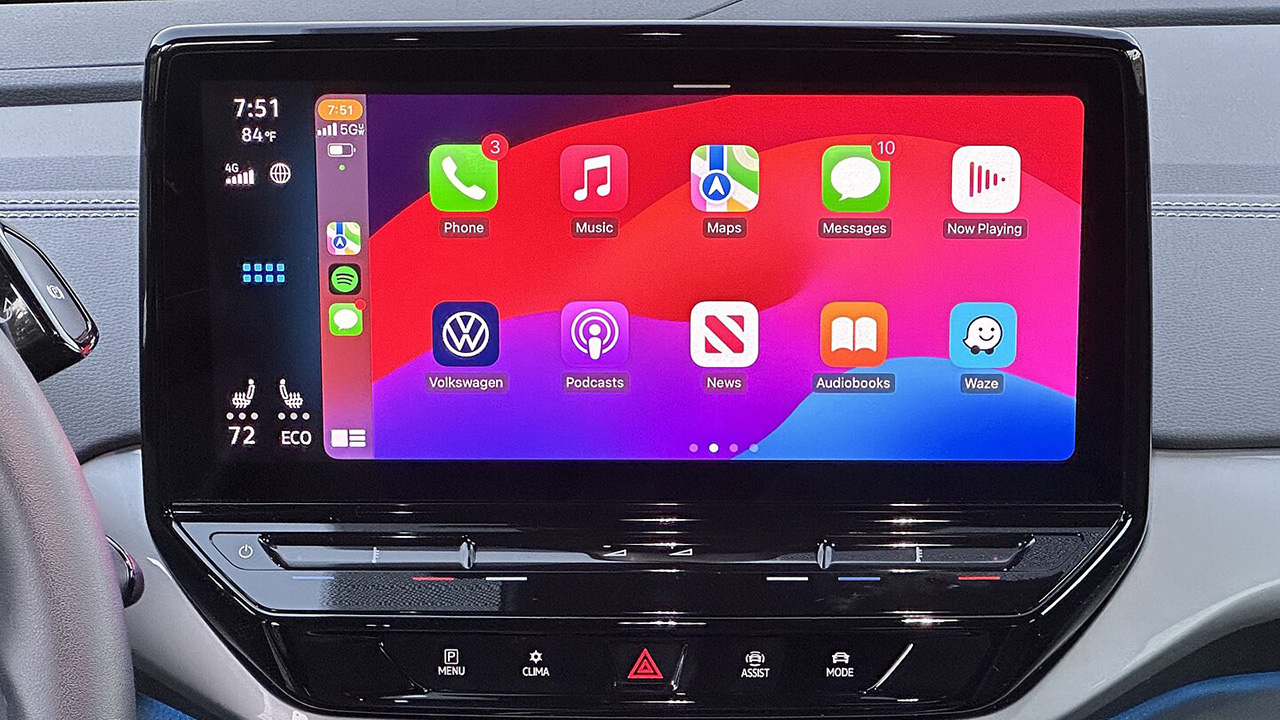
Communication features are well-handled by both systems, with CarPlay utilizing iMessage and Siri for sending messages and making calls. The hands-free functionality is seamless, allowing users to stay connected without taking their eyes off the road. Android Auto offers similar capabilities, with Google Assistant facilitating hands-free messaging and calling through popular apps like WhatsApp and Facebook Messenger. The integration of voice assistants in both systems ensures that drivers can communicate safely while on the move.
Entertainment options are abundant in both platforms, catering to diverse user preferences. Apple CarPlay supports a range of music streaming services, including Apple Music, Spotify, and Pandora, allowing users to enjoy their favorite tunes during commutes. Android Auto offers comparable options, with access to YouTube Music, Spotify, and other popular streaming services. Additionally, both systems provide podcast and audiobook support, ensuring that drivers have access to a variety of media content for a more enjoyable journey.
Performance and Reliability
System responsiveness is a critical factor in determining the user experience of both Apple CarPlay and Android Auto. CarPlay is generally praised for its fast and fluid performance, with minimal lag during navigation and app switching. This responsiveness contributes to a more pleasant user experience, particularly in high-pressure driving situations. Android Auto also performs well, though some users report occasional lag and connectivity issues, particularly when using older devices or vehicles with outdated hardware.
Stability and reliability are essential for a stress-free driving experience, and both systems have their strengths and weaknesses. Apple CarPlay is often considered more stable, with fewer reports of crashes or connectivity issues. This reliability can be attributed to Apple’s control over both hardware and software, ensuring a cohesive experience. Android Auto, while generally stable, may experience occasional hiccups, particularly when using third-party apps or in vehicles with older infotainment systems. However, Google’s continuous improvements and updates help mitigate these issues over time.
Updates and support play a significant role in the longevity and relevance of both systems. Apple regularly updates CarPlay, introducing new features and improvements that enhance the user experience. These updates are often tied to iOS updates, ensuring that users receive enhancements as they upgrade their devices. Similarly, Android Auto benefits from frequent updates from Google, which introduce new features and improve performance. Both companies’ commitment to ongoing support ensures that users can enjoy the latest advancements in automotive connectivity.
User Experience and Feedback
Consumer reviews provide valuable insights into the real-world performance of Apple CarPlay and Android Auto. Many users praise CarPlay for its intuitive interface and seamless integration with iPhones, making it a favorite among Apple enthusiasts. The consistent design and reliable performance contribute to high user satisfaction. Android Auto also receives positive feedback, particularly for its customization options and integration with Google services. Users appreciate the flexibility it offers, allowing them to tailor the experience to their preferences.
Expert opinions from tech reviewers and automotive experts highlight the strengths and weaknesses of both systems. CarPlay is often lauded for its simplicity and ease of use, while Android Auto is praised for its versatility and depth of features. Experts generally agree that the choice between the two systems often comes down to personal preference and brand loyalty, as both offer robust solutions for in-car connectivity.
Personalization and customization play a significant role in user satisfaction, and both systems offer varying degrees of control over settings. CarPlay focuses on simplicity, providing limited customization options to maintain a consistent user experience. In contrast, Android Auto offers more flexibility, allowing users to adjust settings and personalize the interface to their liking. This level of control can be a deciding factor for users who prioritize customization in their in-car experience.